
ALIBABA Discount Code Active-Today OCTOBER 2026
Find 3 verified ALIBABA discount codes here. Save with ALIBABA discount code: $20 off.
Alibaba coupon code: $20 off eligible purchases
Get $20 off an eligible Alibaba purchase after claiming the coupon through your account. Sign in, enter the coupon in Alibaba’s search bar to claim it, then select the saved coupon from your coupon wallet when completing a qualifying order. Less

Copy this code and use at checkout
Copy this code and use at checkout
Deal Activated, no coupon code required!
About ALIBABA
One of the world’s leading retailers and e-commerce marketplace, Alibaba.com offers wholesale B2B opportunities. You can enjoy additional savings by using an Alibaba coupon code at checkout.
Payment options on Alibaba.com:
Alibaba supports multiple payment channels such as T/T, credit card, Online Bank Payment, Boleto, Western Union, Online Transfer, Paypal, ApplePay. Not all payment methods may be available in your country check the detailed list on the checkout page.
Delivery options and shipping costs:
The best way to place an order from Alibaba is to ask the supplier to arrange for the shipping and add the invoice cost. Goods that are shipped via air take just 3~5 business days to arrive anywhere around the globe. Regular post can take up to 15~35 days to arrive.
Returns and refunds:
You are entitled to return orders within 30 days from the delivery date. For a refund, negotiate with the supplier, and if you are unable to reach a consensus, escalate the case for Alibaba.com to help resolve.
How to use an Alibaba coupon code:
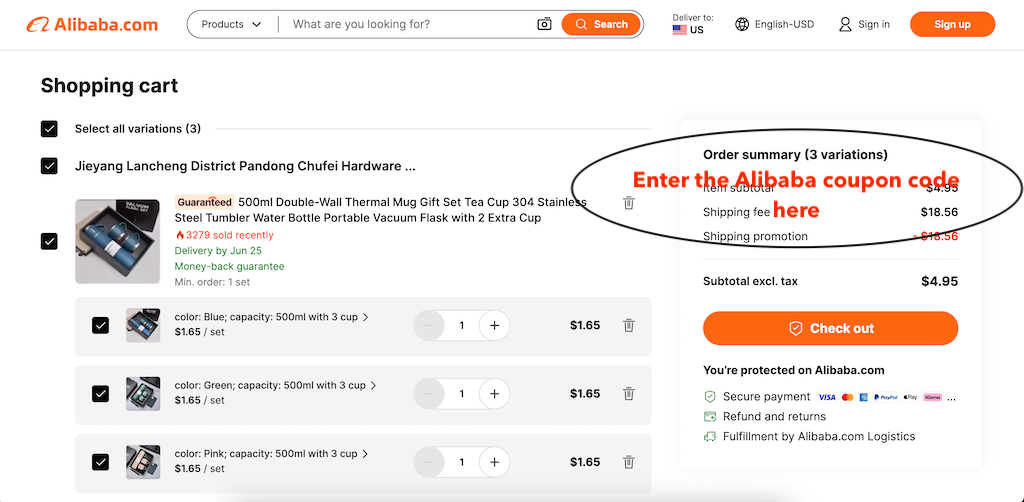
Select the goods you want to order from Alibaba.com, add everything to your online shopping cart, then head to checkout by clicking the “Cart” icon on the upper part of your screen. On the checkout page, locate the “Get coupon” link and click it to open the “Coupons” menu. Enter or select the available coupon, then click “Apply” to redeem the offer. This will automatically apply the discount to your order total.
ALIBABA FAQ
Which ALIBABA Active-Today discount code is best for October 2026?
The best ALIBABA Active-Today
discount code for October 2026 is
KK63
, offering eligible new app users $20 off.
How can I get Alibaba discounts?
Here are several ways you can get discounts on Alibaba: use coupon codes, signup for the newsletter, negotiate with suppliers, signup for the Alibaba credit card and use the advanced filtering/ sorting options to find a deal for a specific product or supplier.
Where can I find an Alibaba coupon code?
Are there any Alibaba coupon codes available?
Yes, there are several active coupon codes available for Alibaba.com always. These codes can provide significant savings on your orders, especially for new customers or specific purchase amounts. Make sure you visit this page when you're planning a purchase, and benefit from current available promotions and deals.
Can I stack coupons on Alibaba?
Unfortunately, Alibaba does not allow coupon stacking. This means you can only use one coupon per order.When shopping on Alibaba.com, combining multiple coupons or applying them to a single order isn't permitted so make sure you choose the most effective coupon for your order.
Top Coupons and Codes for Similar Stores

Copy this code and use at checkout

Copy this code and use at checkout
Copy this code and use at checkout
Copy this code and use at checkout

Copy this code and use at checkout